phMonitor - Your Ultimate phBot Companion
Stop tab-switching and start managing
phMonitor is a free lightweight app for phBot that lets you monitor your Silkroad Online characters from PC, tablet, or smartphone (no account required)
Track live stats, view detailed alchemy logs, and manage your economy through a modern, mobile-friendly WebApp
phMonitor is currently in alpha. Features may change and bugs may occur.
We have no affiliation with Project Hax or the development of phBot. The phMonitor web app is an independent project and "merely" an add-on for the excellent software phBot by Project Hax.
Windows 10 and 11
English, Deutsch, Français, Türkçe, Nederlands, اللغة العربية
PC, Mac, Smartphone, Tablet
Your data is stored on your local PC and not sent anywhere else
Silkroad Skill Calculator
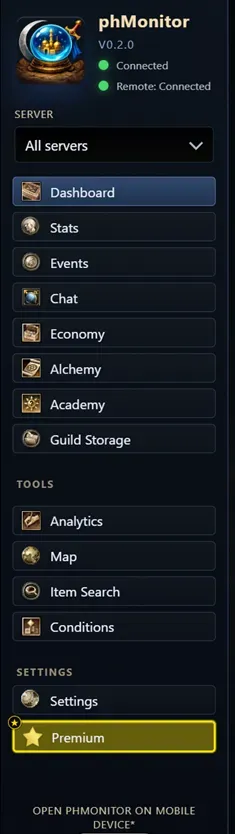
Overview
phMonitor is a free web application designed to make your life easier while managing multiple Silkroad accounts on different servers
It does what you always dreamed of - Check your chars while not on the computer!
- No installation and no account required (works out-of-box)
- Works with phBot v20 or newer (also test builds) on one or more PCs
- Supports multiple servers on different Silkroad versions at the same time (vSRO 1.188 has fully been tested)
- Accessible by any device with a browser (locally and remote)
- Discord and Mail Support
And more:
Customizable
Multi-lingual
User-friendly
Lightweight
TRSRO whitelisted
Security Notice
• phMonitor is a locally hosted Windows program
• All data is stored locally on your PC and cannot be accessed by third-parties
• No data will be sent anywhere externally unless you want it!
Easy 3-Step Setup
Start the app
The app will begin to prepare everything it needs, Please allow network access if you want the access the app from outside the PC it is running on.
Restart phBot/Reload plugins
phMonitor install it's own plugin to your phBot. In order for it to recognize your chars please restart your phBot or reload plugins throughout all phBot instances.
Open the desktop shortcut
A desktop shortcut will be created allowing you easy access from the local PC.
Feature Highlight: Stats
Get detailed information about your chars in real-time
Try this and many more features of phMonitor
Stats
Live view of HP,MP XP/h and SP/h, Storage and Inventory with item icons and values
App Features
A portion of what features phMonitor has to offer!
HP/MP/XP/SP, Storage, Inventory and char sets in real-time
Historical Event log (Deaths, Item drops, Level ups and more)
Use a modern chat messenger for your conversations and globals
Check stall sales and globals offers throughout all servers
Live and historical Alchemy Data + Statistics
Academy changes and apprentice status information
Check last known status of your guilds's storages
Live-Map with chars, item drops, death markers and academy
Search for specific items on all chars and guilds known
Extend phBots Conditions with more usefull triggers and actions
Time-based reoccuring triggers and actions for your chars
Usefull tools to make your life with phBot easier
Plan your chars skills with the in-game skill system
... and many more
Special premium features for a small monthly margin